PrintTraker Adds Directional Signs and More Flexible Ordering Options
PrintTraker is introducing another update designed to make real estate sign printing easier and more organized for licensees and agents. Going live on the morning of August 11, 2026, the update adds Directionals as a new inventory type, introduces improved template filters, and gives agents more flexibility when choosing how each item in their cart will be fulfilled. These enhancements build on PrintTraker’s recently released multi-design cart experience while giving business owners greater control over directional sign inventory.
Directionals Join Panels and Riders
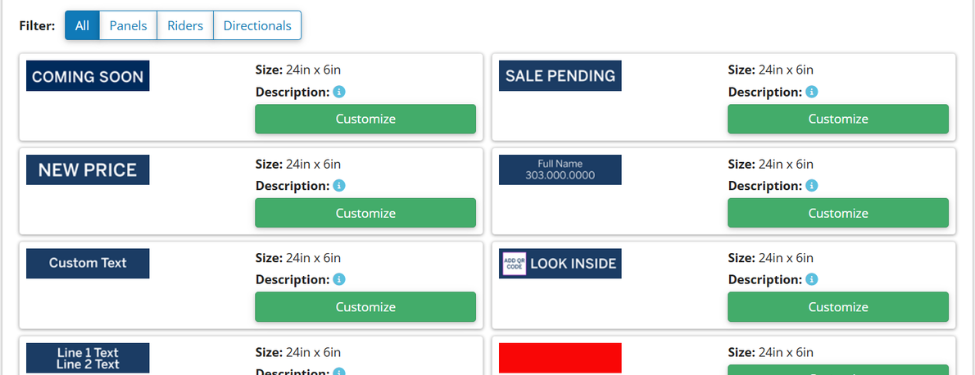
Sign Templates will now include three inventory types: Panels, Riders, and Directionals. When building a template, a licensee can select the appropriate inventory type for that product. Existing directional templates currently categorized as Panels can simply be changed to Directionals without reentering their sizes, artwork, or other template specifications. Templates will also be sorted by size, from smallest to largest, creating a cleaner and more organized catalog.
Licensees Control Directional Inventory
A new option in PrintTraker Settings allows licensees to enable inventory for directional signs. When enabled, agents can order directionals and have them sent directly to the installer for inventory. Business owners who do not want to store or manage directionals can leave this feature turned off. In that case, agents can still order directional signs but will only be able to select agent pickup or delivery to their home or office. This flexibility allows each business to offer the fulfillment methods that work best for its operation.
Easier Filtering and More Fulfillment Choices
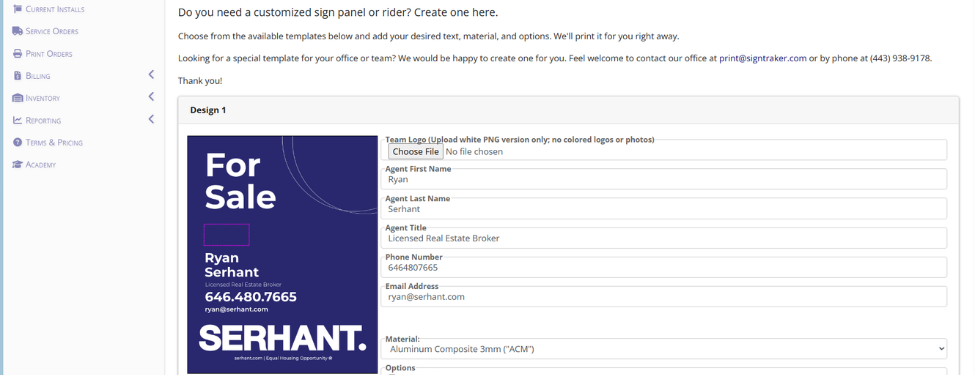
On the agent side, templates can now be filtered by Panels, Riders, or Directionals, with All displayed by default. The updated filters and size-based sorting make it much easier to find the right product. Agents will also see ‘Customize’ instead of ‘Design’ when choosing a template. This more inclusive wording helps reduce confusion because some products, especially certain riders, may not require extensive design changes. Building on the previous PrintTraker cart update, agents can add multiple designs to one order and decide whether each item should be sent to the installer for inventory, delivered to their home or office, or prepared for pickup.
Conclusion
The addition of Directionals, inventory controls, template filters, size sorting, and flexible fulfillment options makes PrintTraker even more useful for sign companies and real estate professionals. Licensees gain more control over the products and services they offer, while agents enjoy a faster and clearer way to customize, order, and receive their signs. When the update goes live on the morning of August 11, PrintTraker will provide an even smarter and more flexible ordering experience for everyone.
For additional information on SignTraker’s real estate sign tracking and real estate sign installation software, or how to join SignTraker’s network of professional sign installers throughout the United States and Canada, contact 443-938-9178 Ext 2.
SignTraker Technologies LLC is a privately held sign installation service software provider located in Gaithersburg, MD. The company supplies cloud-based mobile software, consulting, and durable products to companies and real estate firms interested in providing a superior ordering and sign marketing experience for their stakeholders. For additional information, contact sales@signtraker.com.