ZIP Codes vs. Mapped Service Areas: Choosing the Right Coverage Setup in SignTraker
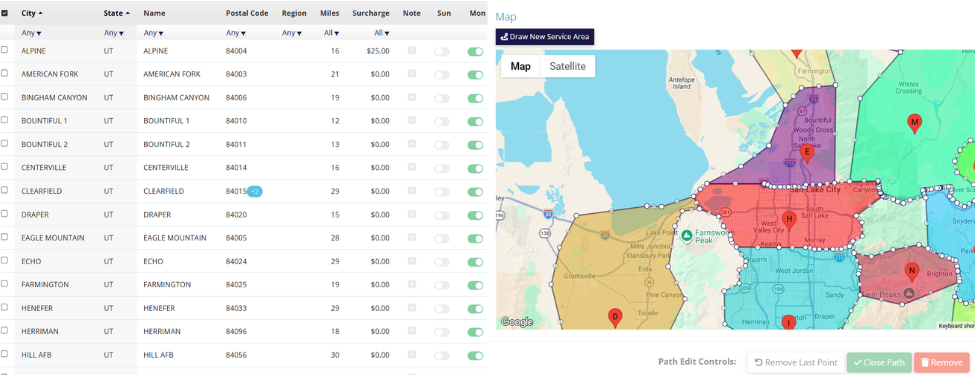
Managing where your installation team works is an essential part of running a smooth sign installation operation. In SignTraker, Licensees can define their coverage using either ZIP Codes or Mapped Service Areas. Both options help determine which installers receive jobs in specific locations, but they work in slightly different ways. Choosing the right setup depends on how detailed you want your coverage to be and how your team operates across different regions.
What ZIP Code Coverage Does
Using ZIP Code coverage is the most straightforward method. Installers simply list the ZIP codes they service, and SignTraker uses those codes to determine job eligibility. This option works best for companies that already organize their coverage by postal regions or want a quick and simple way to define territories. Because ZIP codes are widely used and easy to maintain, many Licensees prefer this method when their service boundaries naturally align with ZIP code areas.
How Mapped Service Areas Work
Mapped Service Areas offer a more visual and flexible approach. Instead of selecting ZIP codes, you draw boundaries directly on a map to outline where your installers operate. This is particularly helpful when service areas do not follow ZIP code lines or when you want to create custom coverage zones around cities, neighborhoods, or travel routes. It gives Licensees greater control and allows them to represent real-world driving areas more accurately.
Using Both Methods Together
One important thing to know is that SignTraker allows you to use both ZIP Code coverage and mapped service areas at the same time. When determining installer eligibility for an order, SignTraker will first check whether a mapped service region has been defined for that location. If a special region exists, that mapped area will be used. If not, SignTraker will fall back to the ZIP code coverage rules.
This approach allows Licensees to maintain simple ZIP-based coverage while also “carving out” special regions where needed—for example, creating custom service zones around busy cities or areas with unique installer assignments.
When to Choose ZIP Codes vs. Mapped Areas
The best option depends on your business needs. If your installers typically cover entire ZIP codes and you want a simple system that is easy to maintain, ZIP code coverage is usually the best choice. However, if your service areas are irregular, overlap multiple ZIP codes, or need to follow geographic features like highways or county borders, mapped service areas may provide better accuracy. Some Licensees start with ZIP codes and later move to mapped areas as their service network grows.
Conclusion
Ultimately, both methods are designed to help SignTraker match jobs with the right installers efficiently. Whether you prefer the simplicity of ZIP codes or the flexibility of mapped service areas, the goal is the same: making sure installers receive jobs in areas they can service reliably. By choosing the coverage method that best reflects how your team operates, you can streamline dispatching, improve response times, and keep installations running smoothly.
For additional information on SignTraker’s real estate sign tracking and real estate sign installation software, or how to join SignTraker’s network of professional sign installers throughout the United States and Canada, contact Douglas Deist, Vice President, Marketing and Technology, at 443-938-9178 Ext 2.
SignTraker Technologies LLC is a privately held sign installation service software provider located in Gaithersburg, MD. The company supplies cloud-based mobile software, consulting, and durable products to companies and real estate firms interested in providing a superior ordering and sign marketing experience for their stakeholders. For additional information, contact sales@signtraker.com.